

-
Direct To Garment (DTG) 0
-
Getting Started 19
-
Texjet® Garment Printers 58
-
Textile Applications 30
-
RIP Software 27
-
PreTreater Pro 15
-
Troubleshooting 20
-
-
Direct To Film (DTF) 1
Pretreater Pro: How to use the system settings


In order to personalize the Pretreater Pro machine, according to your preferences and to the requirements of each pretreatment liquid, at the Home screen in your top right, tap on the Menu button and then on the Settings icon.
First settings page
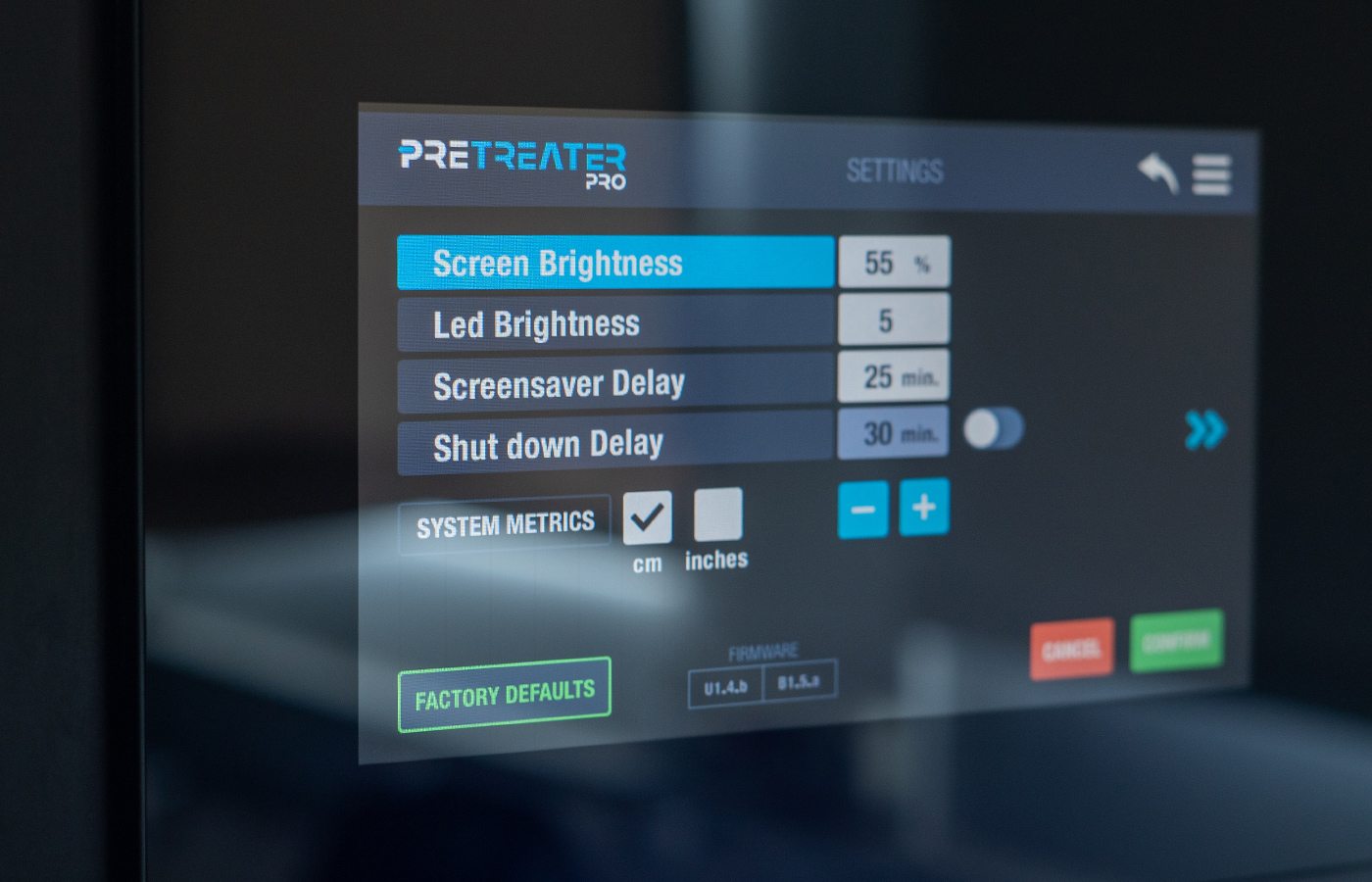
The Screen Brightness, the Led Brightness, the Screen Saver Delay and the Shutdown Delay settings can be adjusted. To do so, you have to select them first and then use the minus/plus icons, according to your preferences.
The Shutdown Delay, is activated only after the finish of the screen saver's duration. When the Shut Down takes place automatically, the machine still has power, but doesn't perform any Nozzle Refresh, neither the cleaning process has taken place, meaning that the tubes are still filled with the liquid that was in use.
Note: The Shutdown Delay setting is optional and you can activate or deactivated it by tapping on the toggle button next to it.
You can, also, choose between two system metrics, cm and inches.
Second settings page
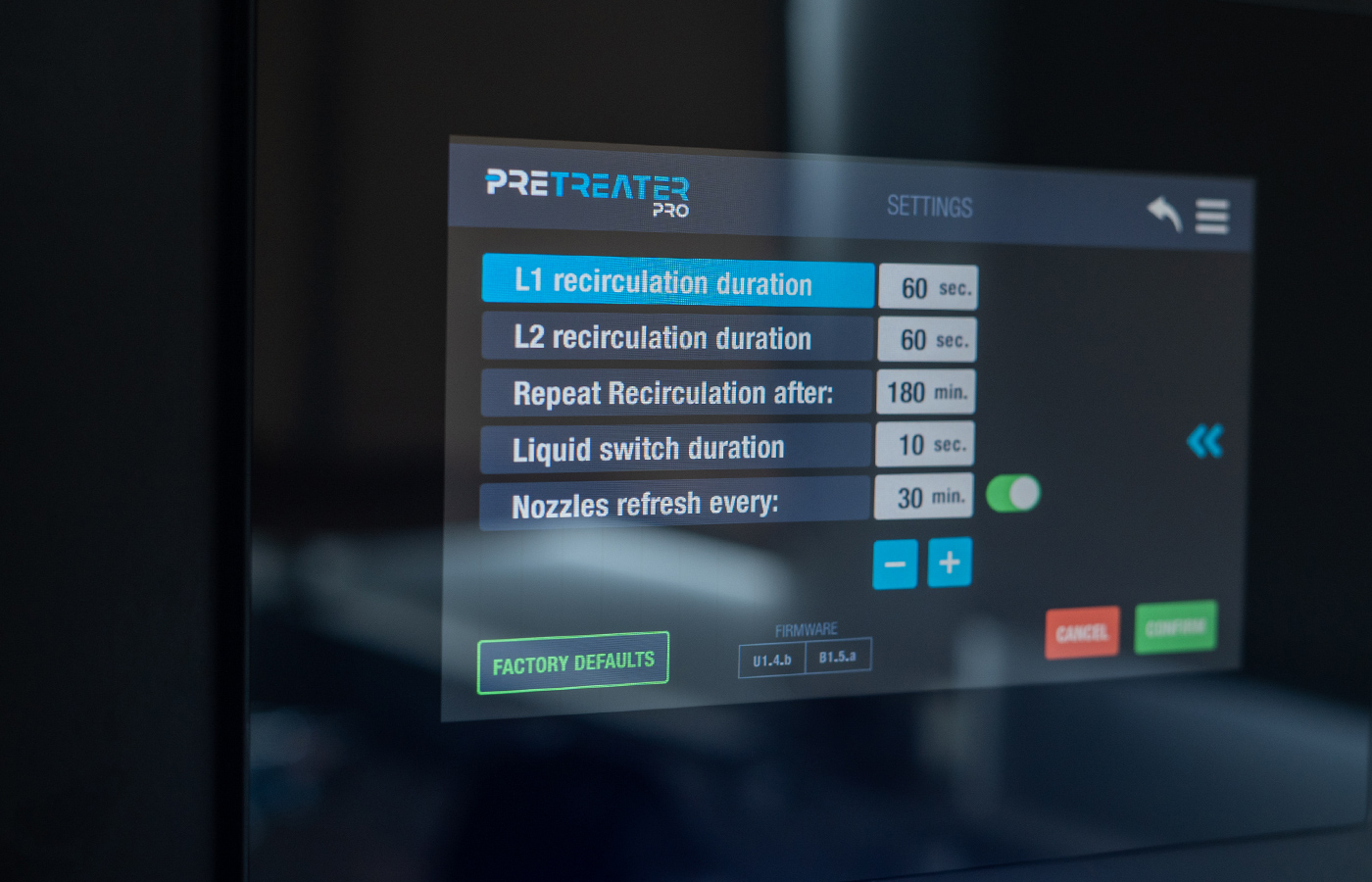
Liquid related settings can be adjusted. You have the option to change the Duration of Recirculation on each pretreatment tank (L1 and L2) and set it according to the characteristics of each liquid. For example, if a pretreatment solution is more prone to form sediment, you can increase the recirculation time, in order to achieve better mixing.
The Frequency of Recirculation can be adjusted, according to your needs, as you can set the time you desire and the stirring process can be repeated as often as you wish.
Note: The recirculation progress, no matter its frequency, never takes place, when PreTreater Pro is in operation. It is only activated, when the machine is idle for an hour, so you don't have to worry that it will interrupt your production.
Another useful setting is the duration of the Automatic Liquid Switch, which can be specified depending on the liquid you are about to use. Some pretreatment liquids require less time and others more, in order to properly fill the tubes and result in homogenous spraying pattern.
In addition, the Nozzle Refresh Frequency can be adjusted, meaning that you can set the desired time you want your nozzles to fire some pretreatment liquid, when PreTreater Pro is idle. This setting has been created as a defense mechanism against clogging. This way your nozzles will always perform 100%.
Note: The nozzle refresh setting is optional and you can activate or deactivated it by tapping on the toggle button next to it.
Last but not least, by pressing the Factory Defaults button, you can reset the values to the predefined settings.
Note: Bear in mind that the presented values, are the ones that Polyprint recommends, upon the pretreatment liquid use of P5001. Also, don’t forget to press Confirm, every time you change settings.


